- Página de inicio /
- Electrónica /
- Accesorios de ordenador /
- Computer Accessories & Peripherals /
- Audio & Video Accessories /
- Webcams & VoIP Equipment /
- Webcams /
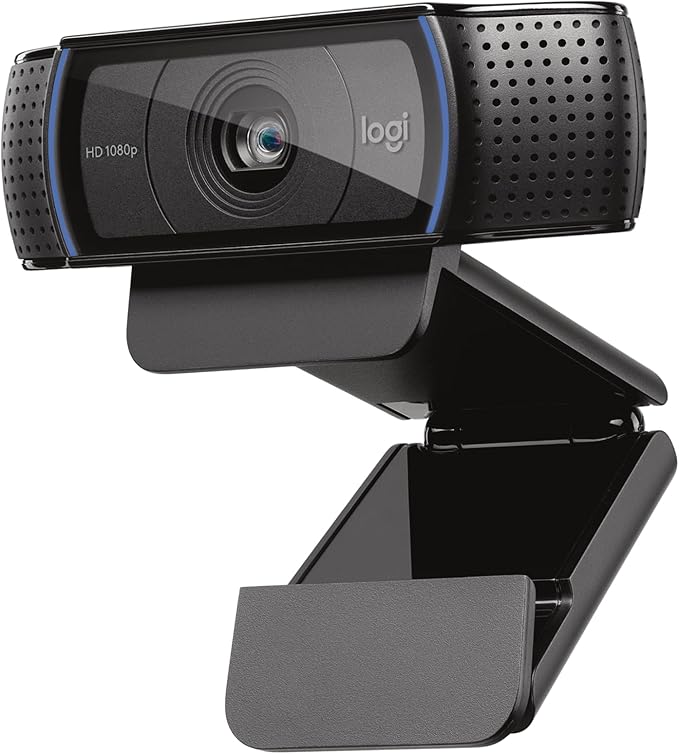
- Logitech C920x HD Pro PC Webcam Full 1080p/30...
0 ratings




Artículo nº.:
223319839
Logitech C920x HD Pro PC Webcam Full 1080p/30fps Video - Black
90% de los encuestados recomendarían esto a un amigo
 2 Sustainability Highlights
Artículo nº.:
223319839
AWG 166
Detalles del precio
Sin incluir gastos de envío y aduana ( Los gastos de envío y aduana se calcularán al finalizar la compra )
*Todos los artículos se importarán desde EE. UU.
0 ratings
Escribe una reseña
10K+ comprado
En stock
 Importado de la tienda USA
CANT.:
Haz tu pedido ahora y recíbelo el Viernes, Octubre 16
Transacción segura
Ubuy trabaja arduamente para proteger tu seguridad y privacidad. Nuestro avanzado sistema de seguridad de pagos garantiza la confidencialidad al cifrar tu información durante la transmisión mediante los protocolos AES (Estándares de Cifrado Avanzado) y SSL (Capa de Conexión Segura). Tus datos de pago están 100% seguros, ya que no compartimos tus detalles de pago con vendedores externos.
Nuestros mejores socios logísticos


Envío
rápido

Devolución
gratuita*

Embalaje seguro

Productos 100% originales

Cumple con PCI DSS

Certificado ISO 27001



Detalles del producto
| Sensor Type | CMOS |
| Connectivity Technology | USB |
| Color | Black |
| Special Feature | XSplit VCam compatibility |
| Photo Sensor Size | 1/2.9 inch |
| Water Resistance Level | Not Water Resistant |
| Form Factor | Webcam |
| Style Name | 1080P/30 fps, 720p/30fps |
| Item Dimensions D x W x H | 1.7"D x 3.7"W x 2.7"H (4.3 x 9.4 x 6.9 cm) |
| Number of Batteries | 1 Nonstandard Battery batteries required. |
| Operating System | [Multiple] |
| Maximum Focal Length | 0.01 millimeters |
| Maximum Aperture | 1.8 f_stop |
| Minimum Focal Length | 2.8 millimeters |
| Lens Type | glass |
| Minimum Aperture | 1.8 millimeters |
| Focus Type | Auto Focus |
| Screen Size | 2.7 inches |
| Viewing Angle | 78 degrees |
| Display Resolution Maximum | FHD |
| Flash Memory Type | Micro SD |
| Flash Memory Speed Class | C10 |
| Flash Memory Video Speed Class | V60 |
| Flash Memory Bus Interface Type | SD |
| Supported Audio Format | [POSSIBLY] MP3, AAC |
| Compatible Devices | Personal Computer |
| Brand | Logitech |
| Model Number | 960-001335 |
| Camcorder Type | Webcam |
| Model Name | C920x |
| Built-In Media | C920x Webcam, USB Cable, User Documentation |
| Antenna Location | video conferencing, live streaming, video recording |
| Unit Count | 1 Count |
| Manufacturer | Logitech |
| UPC | 097855160522 |
| Global Trade Identification Number | 00097855160522 |
| Item Type Name | WEBCAM |
| Video Resolution | 1080p |
| Video Capture Format | Webcam |
| Effective Still Resolution | 1080 pixels |
| Image Capture Speed | 30 frames_per_second |
| Shooting Modes | Shutter Priority |
| Image Aspect Ratio | 16:9 |
| Supported Image Format | JPEG, PNG |
| White Balance Settings | Auto |
| File Format | JPEG |
| Exposure Control Type | Automatic |
| Effective Video Resolution | 1080 pixels |
| Zoom | Optical |
| Photo Sensor Technology | CMOS |
| Video Capture Resolution | 1080p |
| Package Weight | 1.0000 Pound |
Contenido de la caja
C920x Webcam
USB Cable
User Documentation
DESCRIPCIÓN DEL PRODUCTO
Sustainability Highlights
This product has sustainability features recognized by trusted certifications.
Safer chemicals
Made with chemicals safer for human health and the environment. As certified by
ECOLOGO certified products are made with materials that reduce environmental impact at one or more stages of their life cycle, from raw materials to end of life. An ECOLOGO certification indicates that a product has met environmental performance standards, which include criteria in some or all of the following categories: materials, energy, manufacturing and operations, health and environment, product performance and use, and product stewardship and innovation. Products are evaluated on the applicable criteria through testing and auditing. Learn more about this certification
Manufacturing practices
Manufactured using processes that reduce the risk of negative environmental impact. As certified by
ECOLOGO certified products are made with materials that reduce environmental impact at one or more stages of their life cycle, from raw materials to end of life. An ECOLOGO certification indicates that a product has met environmental performance standards, which include criteria in some or all of the following categories: materials, energy, manufacturing and operations, health and environment, product performance and use, and product stewardship and innovation. Products are evaluated on the applicable criteria through testing and auditing. Learn more about this certification
¿Tienes alguna consulta? Chatea con nosotros
Preguntas y respuestas de los clientes
-
Pregunta:
¿Cómo comprar Logitech C920x HD Pro PC Webcam Full 1080p/30fps en línea desde Ubuy?
Respuesta: Es fácil comprar Logitech C920x HD Pro PC Webcam Full 1080p/30fps en línea desde Ubuy.. Solo tiene que buscar el producto, elegir su método de envío al pagar y recibirlo en su ubicación. -
Pregunta:
¿Está Logitech C920x HD Pro PC Webcam Full 1080p/30fps disponible para comprar en línea en Aruba?
Respuesta: Sí, en Ubuy Aruba, este producto está disponible para que lo compre a un precio razonable.. El Logitech C920x HD Pro PC Webcam Full 1080p/30fps no está disponible localmente, pero puede confiar en nosotros con nuestros servicios de envío exprés. -
Pregunta:
¿Cuánto tiempo se tarda en obtener el producto después de realizar el pedido?
Respuesta: El tiempo de entrega de su producto pedido varía según lo que haya pedido y el método de envío que haya elegido.. El tiempo de entrega estimado se menciona durante el proceso de pago, así que no se preocupe mientras compra.
Logitech Webcams 960-001335 Editorial Review
No se encontraron reseñas editoriales
Reseñas y valoraciones de clientes
22007 valoraciones de los clientes
-
5 estrella
78%
-
4 estrella
14%
-
3 estrella
4%
-
2 estrella
1%
-
1 estrella
3%
Escribir una reseña de este producto
Comparte tu opinión con otros clientes
Historial de precios del producto
Información importante
- Limitaciones: para los productos enviados internacionalmente, hay que tener en cuenta que cualquier garantía del fabricante puede no ser válida; las opciones de servicio del fabricante pueden no estar disponibles; los manuales del producto, las instrucciones y las advertencias de seguridad pueden no estar en el idioma del país de destino; los productos (y los materiales que los acompañan) pueden no estar diseñados de acuerdo con las normas, especificaciones y requisitos de etiquetado del país de destino; y los productos pueden no ajustarse al voltaje y otras normas eléctricas del país de destino (lo que requiere el uso de un adaptador o convertidor, si procede). El destinatario es responsable de asegurarse de que el producto puede ser importado legalmente al país de destino. Al realizar un pedido a Ubuy o a sus filiales, el destinatario es el importador registrado y debe cumplir con todas las leyes y reglamentos del país de destino.
- No todos los productos que aparecen en Ubuy están a la venta, ya que Ubuy es un motor de búsqueda global. Los productos están sujetos a las normas de exportación/comercio.
AWG 166
Haz tu pedido ahora y recíbelo el Viernes, Octubre 16
Este artículo no está restringido en mi país. (Haga clic en el enlace anterior si este artículo no está restringido en su país, para que nuestro equipo lo revise y permita).
CANT.:
Transacción segura
Cumplimos con PCI DSS y contamos con la certificación ISO 27001:2022, con pagos cifrados y protección total del comprador en cada pedido.
Nuestros mejores socios logísticos
La entrega internacional más rápida
Garantía Ubuy
Compra sin preocupaciones: productos 100 % originales, pagos seguros conforme a PCI DSS, protección de datos con certificación ISO 27001, la entrega transfronteriza más rápida, devoluciones gratuitas* y embalaje seguro en cada pedido.