- Página de inicio /
- Electrónica /
- Accesorios de ordenador /
- Computer Accessories & Peripherals /
- Keyboards, Mice & Accessories /
- Mice /
- 3Dconnexion SpaceMouse Enterprise Kit 2
0 ratings






Artículo nº.:
97429567
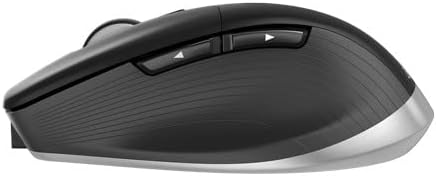
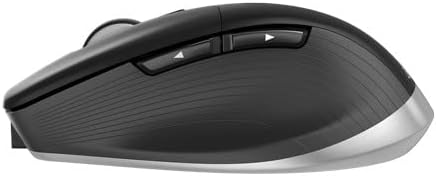
3Dconnexion SpaceMouse Enterprise Kit 2
87% de los encuestados recomendarían esto a un amigo
Artículo nº.:
97429567
AWG 921
Detalles del precio
Sin incluir gastos de envío y aduana ( Los gastos de envío y aduana se calcularán al finalizar la compra )
*Todos los artículos se importarán desde EE. UU.
En stock
 Importado de la tienda USA
Haz tu pedido ahora y recíbelo el Viernes, Septiembre 11
Transacción segura
Ubuy trabaja arduamente para proteger tu seguridad y privacidad. Nuestro avanzado sistema de seguridad de pagos garantiza la confidencialidad al cifrar tu información durante la transmisión mediante los protocolos AES (Estándares de Cifrado Avanzado) y SSL (Capa de Conexión Segura). Tus datos de pago están 100% seguros, ya que no compartimos tus detalles de pago con vendedores externos.
Nuestros mejores socios logísticos


The 3Dconnexion SpaceMouse Enterprise, CadMouse Pro Wireless, and CadMouse Pad create a synergistic ecosystem that simply cannot be recreated using a regular mouse and keyboard.

Envío
rápido

Devolución
gratuita*

Embalaje seguro

Productos 100% originales

Cumple con PCI DSS

Certificado ISO 27001



Lo que más destaca
Advanced Navigation
The SpaceMouse Enterprise Kit offers unparalleled 3D control, allowing users to easily navigate complex 3D designs with precision, reducing time spent on model adjustments in software applications.
Customizable Buttons
Equipped with 12 customizable buttons, this kit enhances workflow efficiency by allowing users to create shortcuts for frequently used commands, boosting productivity in design iterations.
Ergonomic Design
Designed for comfort, the SpaceMouse fits securely in hand, reducing strain during extended usage sessions, making it ideal for professionals engaged in long hours of 3D modeling and design.
Detalles del producto
| Connectivity Technology | Bluetooth, Usb |
| Other Special Features of the Product | 7 Button, Wireless Bluetooth/RF Mouse |
| Compatible Devices | Personal Computer, Laptop |
| Power Source | Battery Powered |
| Keyboard Layout | QWERTY |
| Compatible Operating System Family | Windows |
| Minimum Required Operating System Version | Mac OS 13 Ventura, Windows 11 |
| Operating System | Windows, macOS |
| Number of Keys | 31 |
| Color | Black |
| Brand | 3Dconnexion |
| Keyboard Description | Full-size, soft-coated hand rest with 31 programmable keys, including 8 keyboard modifiers, and a color LCD for visualizing Function Key assignments. |
| Antenna Location | Office |
| Number of Packs | 3 |
| Manufacturer | 3Dconnexion |
| Unit Count | 1 Count |
| UPC | 821123701359 |
| Built-In Media | SpaceMouse Enterprise Kit 2 |
| Model Number | 3DX700135 |
| Mfr Part Number | 3DX-700135 |
| Special Feature | 7 Button, Wireless Bluetooth/RF Mouse |
| Item Weight | 2 lbs (910 grams) |
Contenido de la caja
SpaceMouse Enterprise Kit 2
¿Quién debería comprarlo?

-
3D Designers
Ideal for professionals working in CAD and 3D design, enhancing precision and control over complex models.
-
Virtual Reality Developers
Great for those developing VR applications, providing intuitive navigation and manipulation of 3D environments.
-
Gaming Professionals
Beneficial for game developers needing advanced camera and object manipulation in 3D spaces during development.

-
Casual Users
Not suitable for casual computer users who require basic input devices for standard tasks like browsing and typing.
DESCRIPCIÓN DEL PRODUCTO
¿Tienes alguna consulta? Chatea con nosotros
Preguntas y respuestas de los clientes
-
Pregunta:
What is included in the 3Dconnexion SpaceMouse Enterprise Kit 2?
Respuesta: The 3Dconnexion SpaceMouse Enterprise Kit 2 includes the SpaceMouse Enterprise, a CadMouse, and a CadMouse Pad. The SpaceMouse Enterprise is designed for 3D navigation, providing intuitive control for users working with complex CAD applications. The included CadMouse offers an ergonomic design specifically tailored for CAD professionals, enhancing productivity with its high-precision sensor and customizable buttons. Utilizing both devices together allows for a seamless workflow, ideal for architects, engineers, and designers working on intricate projects. -
Pregunta:
How does the SpaceMouse Enterprise enhance productivity for CAD users?
Respuesta: The SpaceMouse Enterprise significantly enhances productivity by providing 3D navigation that is intuitive and fluid, allowing users to move, zoom, and rotate models with ease. Its six-degrees-of-freedom sensor offers precise control, which reduces the reliance on keyboard shortcuts or mouse gestures. This enables CAD professionals to focus on their design work rather than navigating software interfaces. Scenarios such as switching between different views or quickly accessing tools can be done effortlessly, making it an invaluable tool in fast-paced environments. -
Pregunta:
Is the SpaceMouse Enterprise compatible with all CAD software?
Respuesta: Yes, the SpaceMouse Enterprise is compatible with a wide range of CAD applications, including popular programs like AutoCAD, SolidWorks, and Rhino. It is designed to work seamlessly with both Windows and macOS environments. This compatibility allows users to integrate the SpaceMouse Enterprise into their existing setups without issues. Whether you are modeling complex structures or drafting detailed designs, having such a versatile tool at your disposal ensures that you can work with your preferred software without limitations. -
Pregunta:
Can I customize the buttons on the SpaceMouse Enterprise?
Respuesta: Absolutely! The SpaceMouse Enterprise features customizable buttons that allow users to assign specific functions or shortcuts based on their workflow needs. Using the 3Dconnexion Software, you can configure each button for various tasks, enhancing efficiency when switching between tools or functions. This customization is particularly helpful in complex projects where quick access to specific commands can save time and effort, making it easier to adapt to different design environments or tasks. -
Pregunta:
What are some practical use cases for the 3Dconnexion SpaceMouse Enterprise?
Respuesta: The 3Dconnexion SpaceMouse Enterprise is ideal for architects, engineers, and designers who require precise 3D navigation in their projects. For example, architects can use it to visualize their designs in 3D space, allowing for better spatial awareness and adjustments on-the-fly. Engineers can quickly manipulate components in assemblies without tedious clicks, while 3D artists can navigate complex scenes fluidly. In collaborative settings, this device allows for quicker demonstrations and presentations by providing dynamic control over visuals. -
Pregunta:
Do I need to install software to use the SpaceMouse Enterprise?
Respuesta: While the SpaceMouse Enterprise can be used with basic functionality right out of the box, installing the 3Dconnexion software is recommended to unlock its full potential. This software allows for extensive customization, including button mapping and managing profiles for different applications. With the software, users can also benefit from advanced features like gesture control and enhanced compatibility settings. Overall, installing the software enriches user experience, allowing more tailored control for specific projects or workflows. -
Pregunta:
What is the difference between the SpaceMouse Enterprise and other SpaceMouse models?
Respuesta: The SpaceMouse Enterprise is designed for professional users who require the highest level of detail and control. Unlike other models, it features a larger number of programmable buttons, an ergonomic design tailored for long hours of use, and enhanced sensors for greater precision. The Enterprise model also supports advanced workflows commonly used in professional environments, offering features catered to heavy users. This makes it particularly suitable for CAD professionals who need reliable performance, unlike more basic models that might serve well for casual users. -
Pregunta:
What type of users should consider the 3Dconnexion SpaceMouse Enterprise?
Respuesta: The 3Dconnexion SpaceMouse Enterprise is best suited for professionals who work extensively in CAD software, such as architects, engineers, and 3D modelers. If you regularly navigate complex 3D environments or require precision for your designs, this tool significantly enhances workflow efficiency. Creative industries that involve 3D rendering and modeling also benefit from its intuitive controls. Whether you're drafting detailed schematics or designing intricate scenes, this device is crafted to elevate your productivity and user experience. -
Pregunta:
How does the SpaceMouse Enterprise connect to my computer?
Respuesta: The SpaceMouse Enterprise connects to your computer via a USB interface. It utilizes a reliable wired connection ensuring steady performance without the lag associated with wireless devices. Suitable for both desktop and laptop setups, the device is designed for quick plug-and-play use, facilitating immediate functionality. By minimizing connection issues, it allows users to focus entirely on their projects without interruptions, which is especially important during critical phases of design work. -
Pregunta:
Where can I buy the 3Dconnexion SpaceMouse Enterprise Kit 2 in Aruba?
Respuesta: You can buy the 3Dconnexion SpaceMouse Enterprise Kit 2 from Ubuy, which offers a comprehensive online shopping experience. Ubuy provides a reliable platform that allows you to explore various features of the product, check availability, and place your order conveniently. With Ubuy's user-friendly interface, customers in Aruba can easily access the SpaceMouse Enterprise Kit and have it delivered to their location.
3Dconnexion Mice 3DX700135 Editorial Review
No se encontraron reseñas editoriales
Reseñas y valoraciones de clientes
16 valoraciones de los clientes
-
5 estrella
87%
-
4 estrella
9%
-
3 estrella
0%
-
2 estrella
0%
-
1 estrella
4%
Escribir una reseña de este producto
Comparte tu opinión con otros clientes
Ventajas
- Exceptional precision for 3D navigation
- Ergonomic design reduces hand fatigue
- Customizable buttons enhance productivity
- Compatible with major 3D software
- High-quality build ensures durability
Desventajas
- Steep learning curve for beginners
CONFIANZA EN LA PLATAFORMA Y SEGURIDAD DEL COMPRADOR

JG
Jazz
Verified buyer
“Easy to use and always helpful and sorts any issues I've had past and present”
1 September 2026 · via Trustpilot
EK
Emmanuel
Verified buyer
“I always receive support when I engage customer service. Overall my experience with UBUY has been top notch. Keep up the good work.”
31 August 2026 · via Trustpilot
F
fnd
Verified buyer
“The delivery was fast and the product came undamaged and authentic.”
29 August 2026 · via Trustpilot
LC
Leana
Verified buyer
“Ubuy is extremely efficient and to order online is an easy process. The verity of products to buy is really unlimited! My order was urgent and I got it on time. The products are great! Thank you Ubuy!”
25 August 2026 · via Trustpilot
HL
Hengo
Verified buyer
“Fast, convenient and cheap. Great store!”
27 August 2026 · via Trustpilot
Pago seguro
Entrega mundial
Devoluciones fáciles
Productos genuinos
Historial de precios del producto
Información importante
- Limitaciones: para los productos enviados internacionalmente, hay que tener en cuenta que cualquier garantía del fabricante puede no ser válida; las opciones de servicio del fabricante pueden no estar disponibles; los manuales del producto, las instrucciones y las advertencias de seguridad pueden no estar en el idioma del país de destino; los productos (y los materiales que los acompañan) pueden no estar diseñados de acuerdo con las normas, especificaciones y requisitos de etiquetado del país de destino; y los productos pueden no ajustarse al voltaje y otras normas eléctricas del país de destino (lo que requiere el uso de un adaptador o convertidor, si procede). El destinatario es responsable de asegurarse de que el producto puede ser importado legalmente al país de destino. Al realizar un pedido a Ubuy o a sus filiales, el destinatario es el importador registrado y debe cumplir con todas las leyes y reglamentos del país de destino.
- No todos los productos que aparecen en Ubuy están a la venta, ya que Ubuy es un motor de búsqueda global. Los productos están sujetos a las normas de exportación/comercio.
AWG 921
Haz tu pedido ahora y recíbelo el Viernes, Septiembre 11
Este artículo no está restringido en mi país. (Haga clic en el enlace anterior si este artículo no está restringido en su país, para que nuestro equipo lo revise y permita).
CANT.:
Transacción segura
Cumplimos con PCI DSS y contamos con la certificación ISO 27001:2022, con pagos cifrados y protección total del comprador en cada pedido.
Nuestros mejores socios logísticos
La entrega internacional más rápida
Características y beneficios
- Exclusive 3Dconnexion SpaceMouse Enterprise kit enhances productivity.
- Includes CadMouse Pro Wireless for exceptional precision and control.
- CadMouse Pad ensures smooth and accurate movements.
- Features high-grade materials for excellent quality and durability.
- Lightweight at only 3.95 lbs for easy portability.
- Ideal gift for professionals seeking advanced ergonomic solutions.
Garantía Ubuy
Compra sin preocupaciones: productos 100 % originales, pagos seguros conforme a PCI DSS, protección de datos con certificación ISO 27001, la entrega transfronteriza más rápida, devoluciones gratuitas* y embalaje seguro en cada pedido.